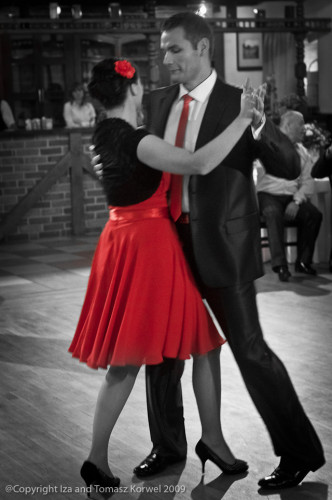
An experiment today. I saw the video tutorial on David Ziser blog last week, and decided to try to apply the effect to a little bit different photo. With the color of bride flowers during the wedding I was shooting, it was much harder to use the technique. But when I looked through the collection of images, my eyes were drawn to the dance on the second day of the wedding, and the bright red elements of clothing of the couple. I used “the spot of color” technique, and certainly liked the effect. It was exactly as I envisioned it.
Camera & Lens: NIKON D300 50.0 mm f/1.8, Flash did not fire.
Focal length:
50 mm
Shutter:
1/40 sec.
ISO:
1600
Aperture:
f/2.8
Posted by Izabela, filed under Wedding. Date: November 20, 2009, 9:24 am |No Comments »
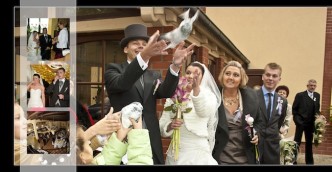
After we returned from my brother wedding I faced the task of preparing the first wedding album. The task was not only very time consuming but also challenged my creativity skills. In the end it was supposed to be my brother’s wedding album, wasn’t it? Fortunately I found help with it. The Album Cafe provides some very fancy album templates, that are customized to White House Custom Color requirements and simplify process greatly. I used the Black Style Album modifying several pages to better fit pictures we took. Here you can see one of the spreads:
Posted by Tomasz, filed under Wedding. Date: November 15, 2009, 12:09 am |2 Comments »
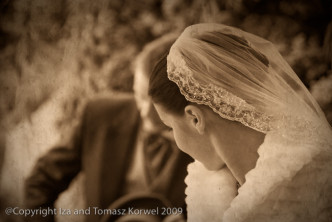
I wanted to do it for a while. Technique for texture is very easy, and is all over the Net, for example a tutorial was posted recently on Digital Photography School or Photofocus blogs. I new that a wedding photograph will look great with sepia tone, on a delicate paper texture to stress even more the vintage look. The only thing left to do was to pick up an image.
Camera & Lens: NIKON D40X 18.0-200.0 mm f/3.5-5.6, Flash did not fire.
Focal length:
200 mm
Shutter:
1/30 sec.
ISO:
400
Aperture:
f/5.6
Posted by Izabela, filed under Wedding. Date: November 6, 2009, 9:59 pm |No Comments »
I don’t think I mentioned it already on a blog, but a couple of weeks ago I had a unique chance to see, if wedding photography is something I could do. Tomasz’s brother was getting married, so since we had to make the unplanned trip back home anyway, we took all our gear, I did some reading beforehand (I actually follow two wedding photogs blogs), and we decided to treat it as serious assignment. I think I will tell more about my/our experience in photographing a wedding next week. Because after downloading about 300o images from two days of shooting and deciding that Tomasz is making a photo album (maybe he will share some experience on blog when he is done? ),
I decided to focus on acquiring new skill. I thought how about, instead of just putting put a gallery on blog, maybe I will make a slide show? And the whole new story started.
Now I am digressing.
When Lightroom 3 Beta showed up a couple of weeks ago, I read on few blogs about new features and although Tomasz downloaded it and suggested that I install it as well, I decided I have no need. I remember how excited I was about LR 2 local adjustment capability, but I have not seen anything for me in LR3. For about a week . And when I stared to think how to put together this slide show, I recalled something I read about LR3, and decided that, after all, I want to try. For a music addition and video format export of slide show.
For a minute, I was put off by the fact that LR3 cannot read LR2 catalog. It was what made me not wanting to try in the first place. But I figured a way around, when it turned out that xmp side-car remembers not only Develop module changes, but also color-coding, which help restore collections in LR3. Export really seemed a blink of the eye, but I was importing images already on hard drive, not through USB. My Import impressions are.. none. I am not unhappy with it, I am also not excited about it. It probably means that is functional all right . Nothing impressive (or unnerving, either) in Develop, just sometimes (then- sometimes not) the images edited in CS4 would not automatically “come back” to LR3, so I need to import them manually. Overall, I made the slide show and I am happy with it, but the jury is out there if I will buy it right after it is released. We will see. In this moment, I probably will quit using LR3 for my current projects, and avoid problems with having images in both versions.
And to come back to my slide show. I decided to make two of them, separate the snaps of the wedding day from posed outside images. So today is part one- walk in the park.
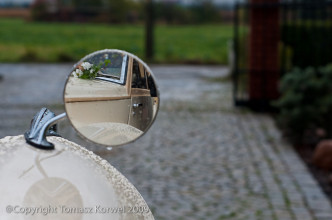
Recently I find myself experimenting more and more with situations where you can shoot your subject by it’s reflection. Sometimes it’s just face in the mirror, sometimes it’s flower bouquet. Using mirror allows me to get some nice depth of field effects. This photo shows the car my brother went in to church for his wedding last week. It’s nice vintage British automobile with side mirrors mounted way ahead on the fenders. Today such thing probably wouldn’t pass pedestrian safety test, but back then nobody really cared.